

Pixel Watch Adds AI-Powered Breathing Emergency Detection That Can Automatically Call for Help
Google is turning the Pixel Watch into a more proactive personal-safety device with a new AI-powered feature capable of detecting signs of a potentially life-threatening breathing emergency and, when the wearer does not respond, automatically contacting emergency services. Called Breathing Emergency Detection, the opt-in feature is designed for situations in which a severe loss of oxygen leaves someone unable to call for help themselves.
Google says breathing emergencies can occur during events such as severe pneumonia, accidental drug overdose or choking, where oxygen saturation can fall to dangerously low levels. In some cases, the person may quickly become unresponsive. The Pixel Watch feature attempts to recognize this pattern and create an automated route to emergency assistance when nobody else is nearby. However, Google emphasizes that the technology cannot detect every breathing emergency and should not be considered a replacement for professional medical care.
How Pixel Watch Detects a Possible Breathing Emergency
Rather than depending on a single measurement, Google’s system uses an AI-based algorithm to evaluate multiple signals from the watch.
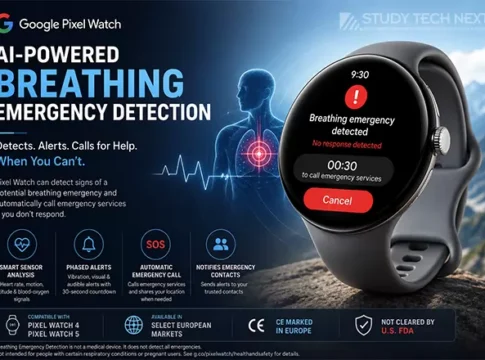
The algorithm analyzes information from heart-rate, motion and altitude sensors while looking for patterns consistent with a potentially serious breathing event. The feature’s goal is to determine whether sensor readings and the wearer’s physical state together indicate that intervention may be necessary.
Blood-oxygen status is central to the safety scenario: Google describes the feature as recognizing when oxygen saturation becomes dangerously low. The algorithm then uses other sensor signals to help determine whether the situation could represent a genuine emergency rather than ordinary activity.
AI Helps Pixel Watch Reduce False Alerts
Automatically calling emergency services requires an exceptionally cautious detection process.
Google therefore designed additional checks intended to reduce unnecessary alerts.
The system verifies that the wearer is in a low-motion state without rapid altitude changes. These signals can help distinguish a potentially unresponsive person from someone who is actively moving or experiencing environmental changes that could interfere with sensor readings.
Google has also designed the system to reduce false notifications associated with sleep conditions such as sleep apnea. Breathing Emergency Detection confirms that the wearer has not already been asleep for more than 30 minutes.
That limitation is significant: Google explicitly says the feature will not detect breathing emergencies after the wearer has been asleep for 30 minutes.
False alerts are still possible. Google warns that poor sensor readings caused by ordinary day-to-day activities may occasionally result in a check-in notification.
Pixel Watch Uses a Phased Emergency Warning System
One of the most interesting parts of Breathing Emergency Detection is how the Pixel Watch responds after detecting a potential problem.
It does not immediately call emergency services.
Instead, Google uses a phased escalation process designed to attract the wearer’s attention while providing an opportunity to cancel an incorrect alert.
First, the Pixel Watch delivers a strong haptic vibration and displays a prominent full-screen notification.
If the wearer does not dismiss it, the watch escalates the warning with an audible alarm.
A 30-second countdown then begins.
The wearer can cancel the process if they are conscious and do not need assistance. If there is still no response when the countdown reaches zero, the emergency process moves forward automatically.
Pixel Watch Can Automatically Call Emergency Services
If the wearer remains unresponsive, the Pixel Watch can prompt either its connected smartphone or an LTE-enabled watch to contact emergency services.
Once connected, an automated voice message tells the emergency operator that the watch detected a possible breathing emergency and that the wearer is not responding.
The system can also provide the wearer’s precise location, helping emergency responders determine where assistance may be needed.
Users who have configured emergency contacts receive another layer of protection. Google says the feature can send those contacts a message informing them that the wearer may require help.
The result is an automated chain:
Detection → vibration → visual warning → audible alarm → 30-second countdown → emergency call → location sharing → emergency-contact notification.
That sequence is designed to balance rapid intervention with safeguards against accidental emergency calls.
Connectivity and Battery Power Are Essential
The automatic emergency call should not be viewed as guaranteed.
Google explicitly states that emergency calling depends on the necessary calling functionality being available. The phone or watch must have sufficient battery power and adequate cellular connectivity.
Emergency services themselves may also not respond in every circumstance.
For an LTE-enabled Pixel Watch with appropriate service, the watch can have its own cellular connection. Google’s general Pixel Watch documentation notes that activated LTE models can contact emergency services without requiring the paired smartphone to be nearby.
Users should therefore make sure their watch remains adequately charged and that their emergency and connectivity settings are properly configured.
Which Pixel Watch Models Support It?
Google says Breathing Emergency Detection is available on Pixel Watch 4 and Pixel Watch 5 in supported European markets.
That is notable because the safety feature is not restricted to Google’s newest Pixel Watch 5.
Eligible Pixel Watch 4 owners can also gain access, extending the new safety capability to an existing generation rather than making it exclusively dependent on purchasing Google’s latest smartwatch.
Where Is Breathing Emergency Detection Available?
At launch, availability is limited geographically.
Google says Breathing Emergency Detection is available in several European countries, including:
Austria, Denmark, France, Germany, Ireland, the Netherlands, Norway, Sweden, Switzerland and the United Kingdom.
Google says it intends to continue working toward making the feature available in additional countries.
Availability should therefore be checked separately from whether a Pixel Watch itself is sold in a particular country. A country supporting Pixel Watch hardware does not automatically mean every regulated health or safety feature is available there.
CE Marked in Europe, but Not FDA Cleared in the United States
Regulatory status is particularly important for this feature.
Google states that Breathing Emergency Detection has been CE marked in the European Union and is available in certain European markets.
However, Google also explicitly states that Breathing Emergency Detection has not been cleared or evaluated by the U.S. Food and Drug Administration (FDA).
Users should therefore not assume that the feature’s European availability means it has received equivalent regulatory authorization in the United States.
Breathing Emergency Detection Is Opt-In
The feature is opt-in, meaning eligible Pixel Watch owners must actively enable it rather than having emergency monitoring silently activated by default.
This is particularly important for a feature that processes health-related sensor signals and can initiate emergency communications.
Before relying on it, users should keep their Pixel Watch software updated, review their emergency information, configure emergency contacts where appropriate and verify that their phone or LTE watch has working calling functionality.
Users should also familiarize themselves with the warning sequence so they know how to cancel an incorrect check-in before an emergency call is initiated.
Important Medical Limitations
Despite its potentially life-saving purpose, Google makes several important limitations clear.
Breathing Emergency Detection does not diagnose or treat a medical condition and does not provide follow-up medical care.
It may also fail to detect some breathing emergencies.
Google says the feature is not intended for people with preexisting respiratory conditions involving chronically low oxygen-saturation levels or for pregnant users.
It also does not operate as an all-night emergency respiratory monitor because detection stops after the wearer has been asleep for 30 minutes.
These restrictions make it important to distinguish emergency detection from continuous medical monitoring.
Pixel Watch should therefore complement—not replace—appropriate medical devices, emergency plans or professional healthcare.
How Google Tested the Technology
Developing a system for rare and potentially life-threatening events creates a major testing challenge: researchers cannot simply wait for real emergencies to occur.
Google says it worked with internal-medicine physicians, cardiologists, anesthesiologists and emergency medical experts to understand how oxygen loss presents in the body.
The company also tested its algorithm in clinical laboratories where volunteers simulated emergency conditions under medical supervision.
Google says the technology was additionally evaluated against hundreds of thousands of hours of real-world data, partly to reduce false alarms caused by circumstances such as sleep apnea or quiet rest.
The company also worked with emergency medical services and public-health leaders to ensure that automated alerts could function within existing emergency-response systems.
Privacy Matters When a Watch Monitors Emergency Signals
A system capable of analyzing physiological signals and sharing location during an emergency inevitably raises privacy considerations.
The opt-in design gives users control over whether the capability is enabled. Users should nevertheless review Google’s applicable health, safety and privacy settings before activation, particularly those governing emergency contacts, sensor information and location permissions.
The most sensitive moment occurs when the system determines that emergency intervention may be required. At that stage, location information can be communicated to emergency responders and configured emergency contacts may be notified.
That information can be extremely valuable during a genuine emergency, but users should understand these permissions before enabling the feature.
How to Prepare Pixel Watch for Breathing Emergency Detection
Eligible users should first confirm that they have a supported Pixel Watch 4 or Pixel Watch 5 and are located in a market where Google has activated the feature.
Install available Pixel Watch and companion-app updates, then locate Breathing Emergency Detection within Google’s applicable health or safety settings and follow the on-screen activation process.
Because the feature is opt-in, users should review all information presented during setup rather than assuming it is already running.
Emergency contacts should be checked carefully, and required location permissions should be enabled if users want location information available during an emergency.
LTE users should verify cellular service. Wi-Fi models should maintain the necessary connection with a compatible phone for calling functionality.
Finally, keep the Pixel Watch sufficiently charged. An emergency feature cannot make a call if the required watch or connected phone has no power.
Pixel Watch Is Becoming More Than a Fitness Tracker
Breathing Emergency Detection demonstrates how the smartwatch category is evolving.
Wearables originally focused heavily on steps, workouts, notifications and basic heart-rate measurements. Newer devices increasingly combine continuous sensors, AI algorithms and connectivity to recognize situations in which the wearer might need assistance.
Google already offers other safety technologies on Pixel Watch, including Loss of Pulse Detection, and Breathing Emergency Detection extends this concept into another potentially life-threatening scenario.
The bigger shift is from passive health tracking toward proactive intervention.
Instead of simply recording information for the wearer to review later, a smartwatch can potentially interpret sensor patterns, determine that something may be seriously wrong, attempt to get the wearer’s attention and seek outside assistance when the person cannot respond.
Frequently Asked Questions
-What is Pixel Watch Breathing Emergency Detection?
It is an opt-in safety feature that uses an AI-based algorithm and Pixel Watch sensor information to recognize patterns associated with dangerously low oxygen saturation and a possible breathing emergency.
-Can Pixel Watch automatically call an ambulance?
The feature can initiate a call to emergency services when a potential breathing emergency is detected and the wearer remains unresponsive through the warning sequence. Actual emergency response is not guaranteed.
-Does it call emergency services immediately?
No. Pixel Watch first provides a strong vibration and visual alert. An audible alarm and 30-second countdown follow if the wearer does not respond. The emergency call is initiated after the countdown if the alert remains unanswered.
-Which Pixel Watches support the feature?
Google currently lists Pixel Watch 4 and Pixel Watch 5 in supported European markets.
-Is Breathing Emergency Detection available in the United States?
Google says the feature has not been cleared or evaluated by the U.S. FDA. Its initial availability is in selected European markets.
-Is it CE marked?
Yes. Google states that the product has been CE marked in the EU.
-Can it detect every breathing emergency?
No. Google explicitly warns that it may not detect every event.
-Does it monitor breathing emergencies throughout sleep?
No. Google says the feature will not detect emergencies after the wearer has been asleep for 30 minutes.
-Does the feature replace medical monitoring?
No. Google says it does not diagnose or treat medical conditions or provide follow-up care.
A Significant Step Toward Proactive Wearable Safety
Pixel Watch Breathing Emergency Detection represents an important development in how AI and wearable sensors can be combined for personal safety.
Its most important innovation is not simply measuring another health metric. The watch attempts to interpret multiple physiological and contextual signals, determine whether the wearer may be unresponsive, escalate warnings and ultimately seek assistance when necessary.
At the same time, Google’s extensive disclaimers are just as important as the technology itself. The feature can miss emergencies, false alerts remain possible, connectivity and battery power are required, and it is not intended to diagnose disease or replace professional medical monitoring.
For eligible Pixel Watch 4 and Pixel Watch 5 owners in supported European markets, however, it adds an unusual layer of automated protection: a watch that may be able to recognize when its wearer cannot call for help—and attempt to make that call on their behalf.
🔥 Key Highlights of Pixel Watch Breathing Emergency Detection
- 🤖 Uses an AI-based algorithm to identify potential breathing emergencies.
- ❤️ Analyzes signals involving heart rate, motion and altitude, alongside dangerous oxygen-saturation patterns.
- 🚨 Begins with a strong haptic vibration and full-screen warning.
- 🔊 Escalates to an audible alarm and 30-second countdown when the wearer does not respond.
- 📞 Can automatically initiate an emergency-services call after the countdown.
- 📍 Can provide the wearer’s location to emergency responders.
- 👨👩👧 Can notify configured emergency contacts.
- ⌚ Available on Pixel Watch 4 and Pixel Watch 5.
- 🇪🇺 Initially available across selected European markets.
- ✅ The product is CE marked in the EU.
- 🇺🇸 Google says it has not been cleared or evaluated by the U.S. FDA.
- ⚙️ The feature is opt-in, giving users control over activation.
- 🛌 It does not detect breathing emergencies after the wearer has been asleep for 30 minutes.
- ⚠️ Poor sensor readings can potentially produce an unnecessary check-in.
- 🔋 Emergency calling depends on sufficient battery and cellular connectivity.
- 🩺 It is not a diagnostic or treatment tool and cannot detect every emergency.
- 🌍 Google plans to work toward expanding availability to additional countries.
- 🚀 Shows how smartwatches are evolving from passive fitness trackers toward AI-powered proactive safety devices.