
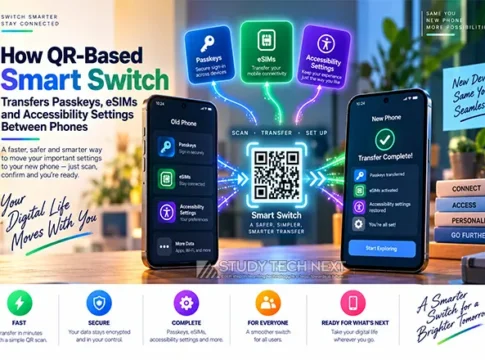

In the ever-evolving landscape of mobile technology, transferring data between devices has become a crucial aspect of user experience. Samsung’s latest innovation, the QR-Based Smart Switch, offers a seamless solution for transferring passkeys, eSIMs, and accessibility settings between phones. This guide, based on Samsung’s August 25, 2026, guidance, explores how this technology facilitates the migration from iOS or Android to supported Galaxy devices, ensuring a smooth transition for users.
Key Highlights
– Launch Date: August 25, 2026, by Samsung.
– Supported Data: Contacts, media, messages, call history, passwords, passkeys, accessibility settings, and eSIM information.
– Availability: Compatible with iOS and Android devices transitioning to Galaxy devices.
– Benefits: Streamlined data transfer, enhanced security, and improved user experience.
– Risks: Compatibility issues, carrier activation challenges, and potential data loss.
What You Will Learn
– Understand the process of device migration using QR-Based Smart Switch.
– Learn about credential portability and its impact on user convenience.
– Explore the intricacies of eSIM transfer between devices.
– Gain insights into backup validation and its importance.
– Identify potential pitfalls and how to mitigate them during data transfer.
Understanding QR-Based Smart Switch
Samsung’s QR-Based Smart Switch is designed to simplify the transition from iOS or Android devices to Galaxy smartphones. By leveraging QR codes, users can initiate a wireless transfer of various data categories, including contacts, media, messages, call history, passwords, passkeys, accessibility settings, and eSIM information. This method not only enhances the speed of data transfer but also ensures a higher level of security.
Supported Data Categories
The QR-Based Smart Switch supports a wide range of data categories, making it a comprehensive solution for users. Key data types include:
– Contacts and call history
– Media files such as photos and videos
– Messages and chat histories
– Passwords and passkeys
– Accessibility settings for personalized device use
– eSIM information for seamless network connectivity
Quick Share Interoperability
Quick Share, Samsung’s proprietary sharing feature, enhances the interoperability of the QR-Based Smart Switch. It allows users to share files and data effortlessly between Galaxy devices, further streamlining the transition process.
Limitations and Considerations
While the QR-Based Smart Switch offers numerous benefits, users should be aware of certain limitations. Compatibility issues may arise with older devices, and carrier activation for eSIMs can present challenges. Additionally, encrypted applications may not transfer seamlessly, necessitating manual reinstallation and setup.
Transfer Verification and Backups
To ensure a successful transfer, users should verify the data post-migration and maintain backups. This precaution helps mitigate the risk of data loss and ensures that all critical information is preserved during the transition.
What Can We Learn from This Topic?
The introduction of QR-Based Smart Switch highlights the importance of seamless data migration in enhancing user experience. By understanding the process and potential pitfalls, users can better prepare for device transitions. Here are some practical steps and considerations:
– Create a pre-migration checklist to ensure all data categories are accounted for.
– Address common misconceptions about data transfer, such as the belief that all apps will automatically transfer.
– Prioritize privacy and data-loss precautions by maintaining secure backups.
– Consider examples from everyday users to understand potential challenges and solutions.
In conclusion, Samsung’s QR-Based Smart Switch represents a significant advancement in mobile technology, providing users with a reliable method for transferring passkeys, eSIMs, and accessibility settings. By understanding the process and preparing adequately, users can enjoy a seamless transition to their new Galaxy devices, minimizing the risk of data loss and enhancing their overall experience.“The QR-Based Smart Switch is a game-changer for users transitioning between devices, offering a secure and efficient way to transfer essential data.” – Samsung, August 2026