
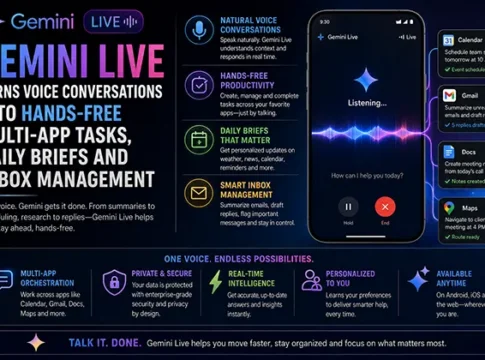

Gemini Live, Google’s latest innovation, is revolutionizing the way we interact with technology by transforming voice conversations into hands-free multi-app tasks. This August 26 productivity update introduces a suite of features under the umbrella of Personal Intelligence, including Daily Briefs, Gemini Spark, and enhanced app connections. These advancements promise to streamline tasks such as email management, document creation, and background projects, offering a new level of convenience for mobile and Gemini users. However, as with any technological leap, there are considerations regarding accuracy, automation limitations, and privacy risks. Let’s delve into the details of this groundbreaking update and explore its implications for the future of voice-controlled technology.
Gemini Live: A New Era of Productivity
The Gemini Live update is a significant step forward in Google’s mission to enhance productivity through voice technology. By integrating Personal Intelligence, users can now manage their daily tasks more efficiently. This update is particularly beneficial for those who rely on mobile devices, as it allows for seamless multitasking across various applications without the need for manual input.
Personal Intelligence and Daily Briefs
At the heart of Gemini Live is Personal Intelligence, a feature designed to provide users with a personalized experience. Daily Briefs offer a concise overview of important tasks, appointments, and reminders, ensuring that users start their day fully informed. This feature is particularly useful for professionals who need to stay on top of their schedules without sifting through multiple apps.
Gemini Spark and App Connections
Gemini Spark enhances the functionality of voice commands by enabling users to connect with multiple apps simultaneously. This means that tasks such as sending emails, updating calendars, and managing to-do lists can be executed with a single voice command. The integration of app connections ensures that all relevant applications work in harmony, providing a cohesive user experience.
Voice-Controlled Email Management and Document Creation
One of the standout features of Gemini Live is its ability to manage emails and create documents through voice commands. Users can dictate emails, organize their inbox, and even draft documents without lifting a finger. This hands-free approach not only saves time but also reduces the cognitive load associated with switching between tasks.
Setup and Availability
Setting up Gemini Live is straightforward, with the update being rolled out to all compatible mobile and Gemini devices. Users can activate the features through their device settings, ensuring that they have the latest version of the software. While the update is currently available to a broad audience, some features may be staged for future release, depending on user feedback and technological advancements.
Convenience Benefits and Limitations
The convenience of Gemini Live is undeniable, offering users the ability to manage tasks effortlessly. However, there are limitations to consider. The accuracy of voice recognition can vary, and automation may not always perform as expected. Users should be aware of these potential pitfalls and have backup plans in place for critical tasks.
Privacy and Permission Risks
As with any voice-controlled technology, privacy and permission risks are a concern. Users must grant access to various apps and data, which could pose security risks if not managed properly. Google has implemented safeguards to protect user data, but individuals should remain vigilant and regularly review their privacy settings.
Comparisons with Rival Voice Assistants
Gemini Live stands out among rival voice assistants due to its comprehensive integration of multi-app tasks and personalized intelligence. While competitors like Amazon Alexa and Apple Siri offer similar functionalities, Gemini Live’s focus on productivity and seamless app connections gives it a competitive edge. However, users should evaluate which assistant best meets their specific needs.
Practical Safeguards and Expert Perspectives
Experts recommend several practical safeguards for users of Gemini Live. These include regularly updating software, reviewing app permissions, and using strong passwords. By taking these precautions, users can enjoy the benefits of voice-controlled technology while minimizing potential risks.
FAQs and Future Implications
- What is Gemini Live? Gemini Live is a Google update that transforms voice conversations into hands-free multi-app tasks.
- How does it improve productivity? By integrating Personal Intelligence and app connections, it allows for seamless multitasking and efficient task management.
- Are there privacy concerns? Yes, users should be aware of privacy and permission risks and take necessary precautions.