
About Us

At Study Tech Next, we’re committed to bringing you insightful, up-to-the-minute content across a spectrum of topics that impact our daily lives.

― Advertisement ―

LVMH’s Luxury Slowdown Shows How Brand Concentration and Regional Demand Can Shape a Global Business

Explore how LVMH's luxury slowdown reveals the impact of brand concentration and regional demand shifts on global business strategies. Learn about the risks of over-reliance on key markets like China and how strategic diversification can mitigate these challenges. Discover insights into maintaining business stability and growth.
HomeNewsBusinessSmartThings Now Explained: Contextual Controls, Local Processing and Better Offline-Device Recovery

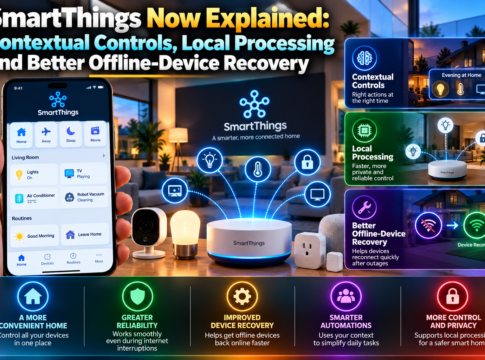
SmartThings Now Explained: Contextual Controls, Local Processing and Better Offline-Device Recovery

SmartThings has revolutionized the way we interact with our smart devices, and the latest update, announced on October 7, 2026, brings even more exciting features. This update enhances contextual controls, local processing, and offline-device recovery, making your smart home more efficient and reliable. In this article, we delve into the key highlights of this update, explore what you will learn, and discuss how and why these features work. We also examine practical applications, limitations, and learning takeaways to help you make the most of SmartThings Now. Key Highlights
  • Introduction of SmartThings Now for seamless device management across mobile devices, televisions, appliances, and supported hubs.
  • Revamped Home-tab for easier navigation and personalized device control.
  • Samsung reports over 200 million users and partnerships with 500 brands globally.
  • Enhanced local-versus-cloud control for faster and more reliable device operations.
  • Improved offline diagnostics to troubleshoot devices without internet connectivity.
  • Support for Matter 1.6 categories, expanding compatibility and availability of smart devices.
  • Focus on privacy and security with advanced encryption and user data protection.
  • Energy meters and soil sensors integration for smarter energy management and gardening.
What You Will Learn
  • How SmartThings hubs facilitate seamless device connectivity and control.
  • Creating and managing routines for automated home environments.
  • Understanding the context-aware features for personalized device interactions.
  • Benefits of local execution for faster response times and reduced latency.
  • Cloud fallback mechanisms ensuring device functionality during local failures.
  • Device diagnostics tools for proactive maintenance and troubleshooting.
  • Integration of energy meters for efficient energy consumption tracking.
  • Utilizing soil sensors for optimized gardening and plant care.
How and Why It Works The SmartThings update leverages location and hub availability to determine whether commands are executed locally or remotely. When a hub is available, commands are processed locally, ensuring faster execution and reduced latency. In the absence of a hub, the system intelligently switches to cloud processing, maintaining functionality and reliability. This dual approach enhances user experience by providing seamless control regardless of connectivity conditions. Practical Applications Migrating to the new SmartThings platform is designed to be privacy-conscious, with robust encryption protocols safeguarding user data. To test reliability, users can simulate network outages to observe how devices switch between local and cloud processing. This ensures that your smart home remains operational even during connectivity disruptions, providing peace of mind and continuous service. Limitations and Misconceptions While Samsung claims extensive compatibility with Matter 1.6, not all features may be available on every certified device. Controlled tests have shown that some household results may vary, highlighting the importance of verifying device-specific capabilities. Users should be aware that certified compatibility does not guarantee full feature access, and it is advisable to consult device specifications for detailed information. Learning Takeaways
  • Ensure your SmartThings hub is updated to the latest firmware for optimal performance.
  • Regularly review and update device routines to align with your lifestyle changes.
  • Utilize the new diagnostics tools for proactive device maintenance.
  • Explore the integration of energy meters and soil sensors for enhanced home management.
  • Stay informed about future updates to leverage new features and improvements.
In conclusion, the SmartThings update significantly enhances the smart home experience with its focus on contextual controls, local processing, and offline-device recovery. By understanding and utilizing these features, users can enjoy a more efficient, reliable, and secure smart home environment.